
NB: Those who we help – must like this page and comment as we spent time explaining this especially for you and your well-being!
For many years there was a loophole: PayPal would let you withdraw USD funds directly into your Royal Bank USD Savings account. The reason was very simple: RBC offered a much better USD – CAD conversion rate over PayPal (Especially if you went into a major branch and told them you want to match a rate).
Royal Bank of Canada is the only Canadian bank that used to allow and still allows this loophole.
Is the loophole closed now? – Partially (2016-2017). PayPal is making things more complicated; PayPal wants to make more money from your account on that exchange rate. You will now need to use an extra step in order to link your PayPal USD account to your Canadian Bank USD account.
Here is the (WORKING) workaround that enables the good old Loophole:
Considering you already have a Canadian PayPal account and USD currency that you would like to withdraw.
- 1. Open up an RBC US savings / checking account and get your account number (7 digits but you will need all 12 digits): like 04000-4535352 = (040004535352)
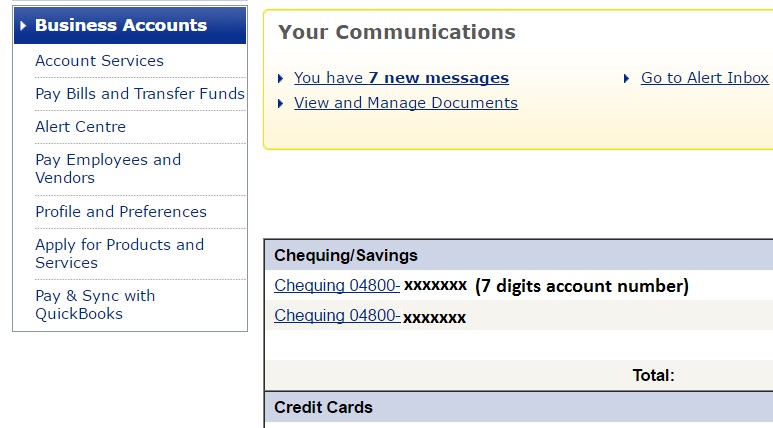
- 2. Go to PayPal and click on add a bank (Profile > Profile and Settings > My money > Bank Accounts – Update).
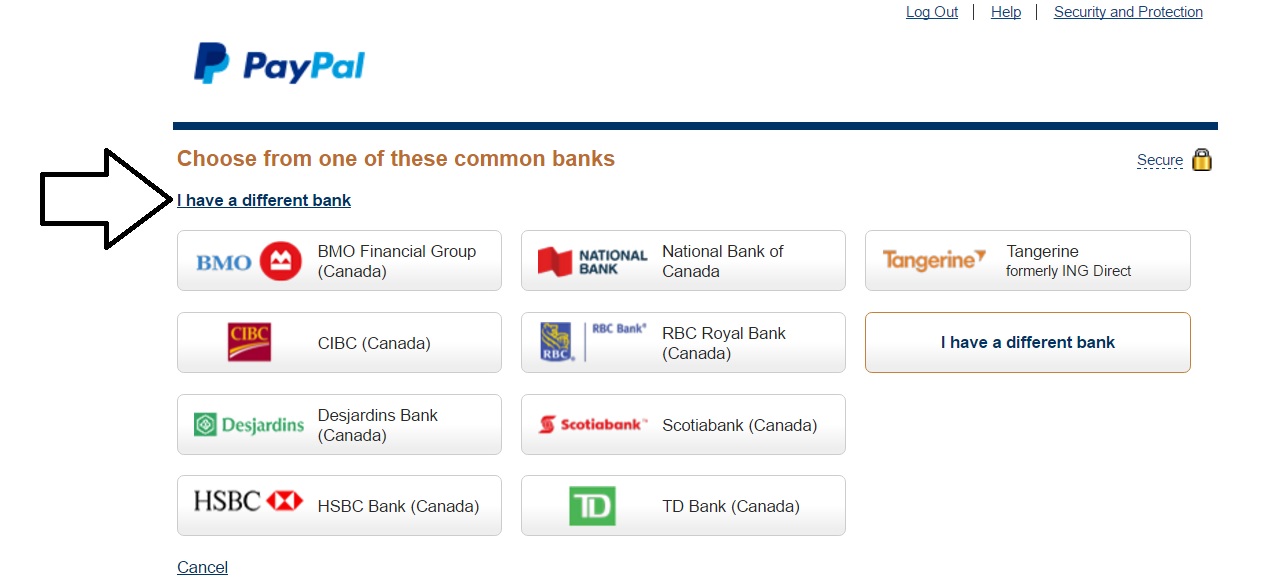
Do not click on Add, it will not work (feel free to click and try and start dialing PayPal with keeping that page open).
- -Standard RBC US Routing number: 026004093 (one fits all solution)
- -Account number: 12 digits, get it through online banking as shown on the pic #1. (ex: 040004535352)
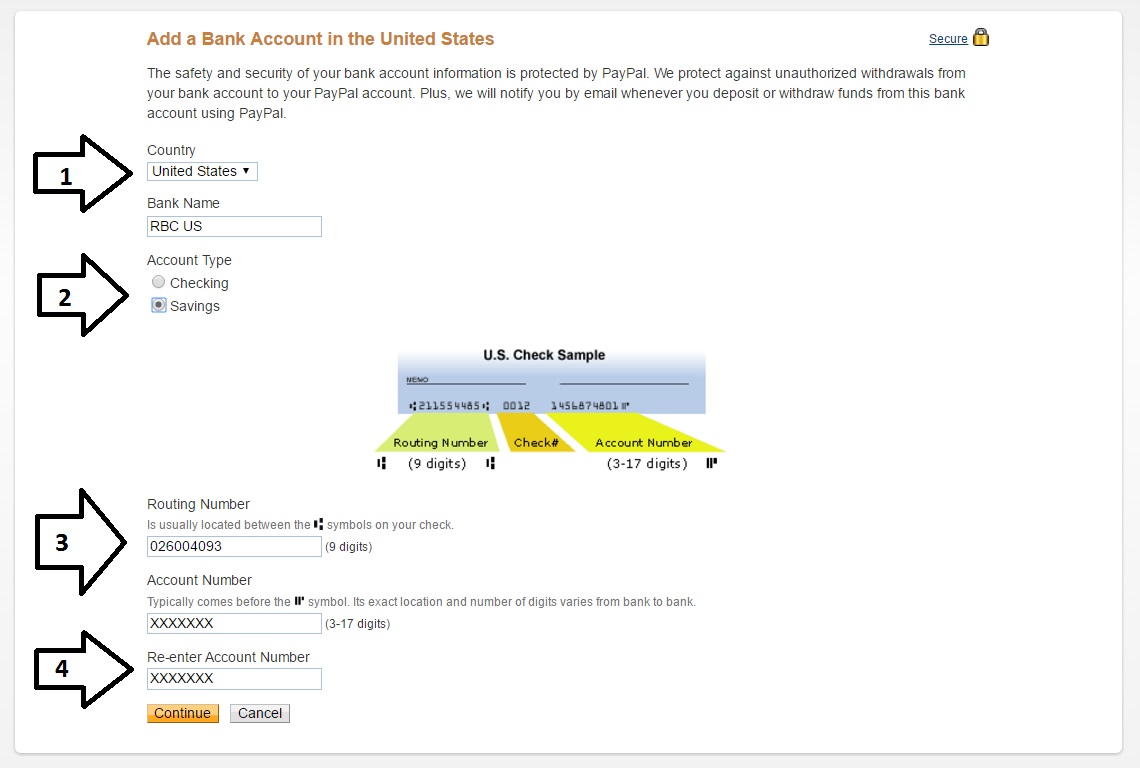
- 3. Call PayPal and ask to talk to a tech specialist as you have a tech problem with your bank account (or tech exchange rate specialist). A regular support rep will not be able to help, as they are trained to answer: ‘That cannot be done”…
- 4. Tell that tech specialist that you are trying to add an account for a better exchange rate option – tell them to enable it and with them on the phone click on that ADD button. It will work.
- 5. Once you get a confirmation – wait for micro deposits and verify the USD bank account. After – you will be able to withdraw USD cash into your RBC USD account. Please note that you should not try to use this link to deposit USD into your PayPal USD account (It should not work, it work only for withdrawals).
Since PayPal is trying to milk more out of every account these days – we suggest YOU to link such account asap, before they close it all together…
Please comment so that visitors can be updated if this method still works based on your comment date.
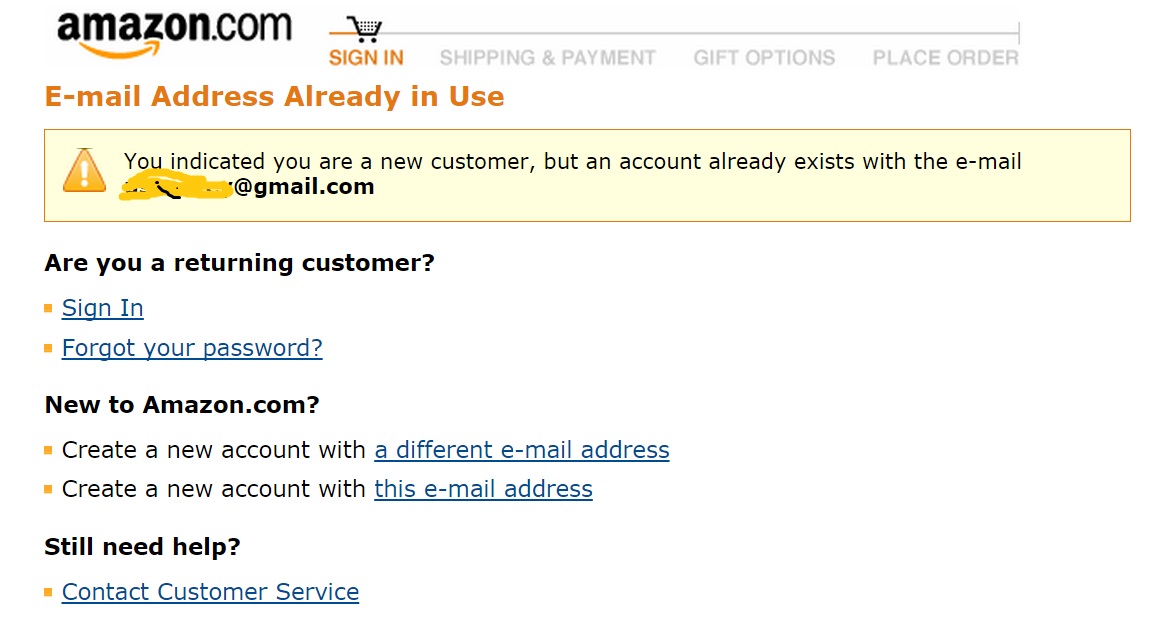
Although Amazon is the biggest IT company in the world – it has a few weak points. #1 – UE (User Experience) – try to reset an Amazon password (something that is done by tens of thousands of people every day):
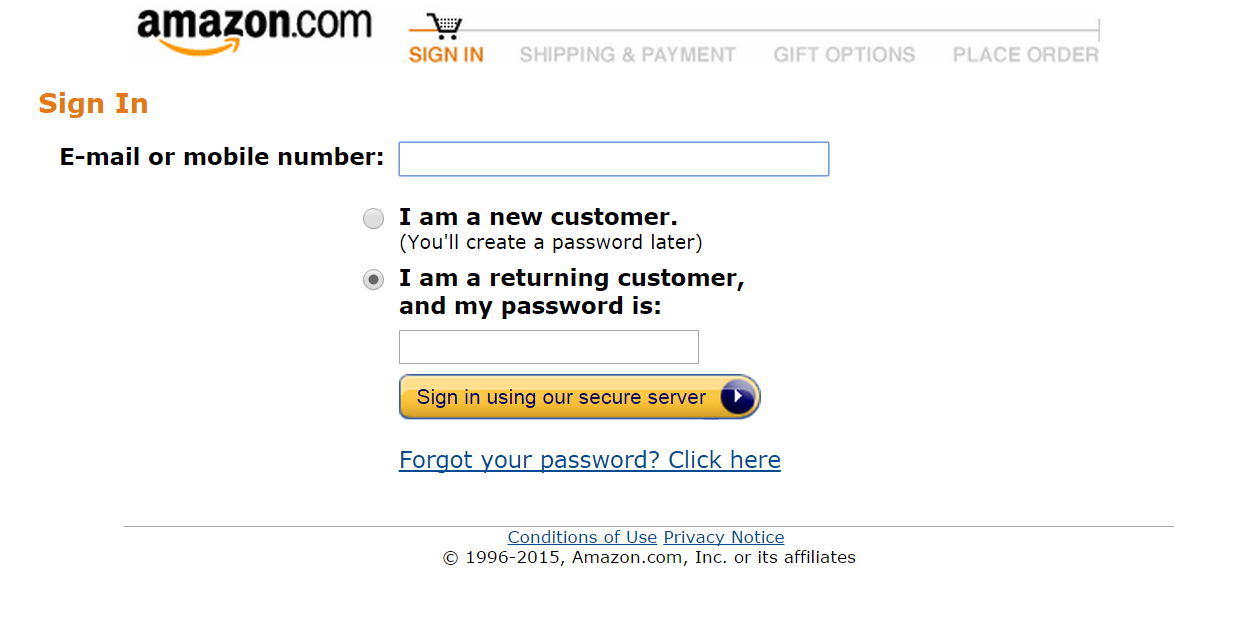
Amazon asks for your e-mail because your e-mail is already registered:
Amazon recovery method is asking for Zip code:
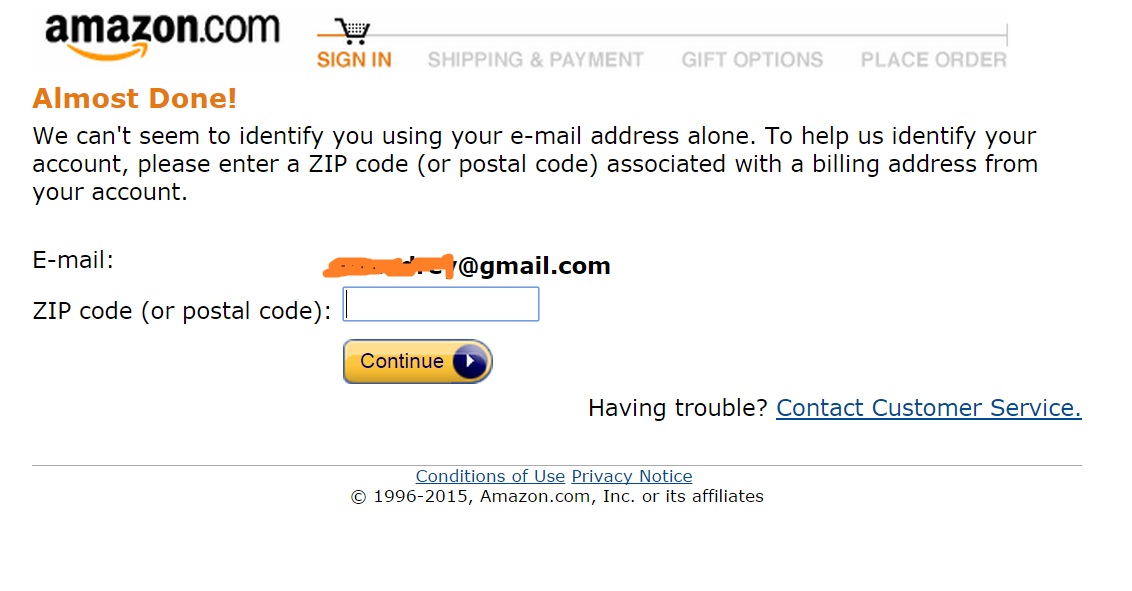
If you do not know your past zip or can not remember it – then what are the quick options? Anyone knows a way out?
WELL, if you have changed your address for a few times per year you may not know all that. Resetting and Amazon account password should be easier than it is right now.
Online service or product ordering process at times can be multi-stages and not all too transparent. Below are 5 most common e-commerce order process mistakes.

1. Obligatory Online Registration
Many of us would say that mandatory registration is very useful because you can get the customers` contacts for your future email advertising campaigns. Yet, in many cases – number of lost orders could be much higher than the number of successful once that you could get by using those contacts in your email marketing campaigns.
In addition, if needed, you could always win users’ contacts on voluntarily basis through discounts, contests, bonuses etc.
2. A long ordering process (multi-stage order forms)
There are sites that require 3-4 order steps from you, including your passport detail, to get an order placed. Although, in most cases – if your product / offer is not unique, most customers will leave the shopping cart empty and go to a more adequate competitor who appreciates the time of its customers.
3. Too much information required
For example, you may not have to register on the website and ordering process consists of only one step, but you want the users to specify a full address along with the zip code, which often buyers cannot remember, yet without which – clients are not allow to finalize the purchase.
Ask only crucial info to have the order started / done and to correctly address the product delivery.
4. Transparent information about shipping and payment
Try not to narrow the payment methods or shipping options down – offer maximum transparency and flexibility.
5. Speed of your Website
Your site must work really fast! Customers do not like waiting for pages to load, for shopping carts to update. Try to have your site load and operate – instantaneously.
Check Google site speed tool here – https://developers.google.com/speed/pagespeed/insights/. Preferably, be hosted on SSD type hosting within the country that most of your customers come from – this will significantly affect your site’s user experience.
How to get someone out there on the internet to post a link back to your website? Sounds fantastic, right? In fact, it is real and you can easily verify this by visiting a website – majestic.com to review backlinks to articles on popular websites (times.com, theverge.com etc…).

Organic links to these articles are posted based on two reasons:
- 1. The content that’s published on the site is original and qualitative, written by professionals and experts in a particular field, which in return, gives it a lot of credibility.
- 2. Website has a high traffic, thus it’s content is noticed by lots of people and a certain percent starts to share this content on different blogs, forums, social media, elsewhere.
Link Building
Right away we have a great question: what if such particular website has a zero traffic? To cut the long store short – here is what you can do to drive traffic to a particular URL:
- 1. If your article is really worthy and professional, then you can find websites (blogs, forums, “ask” services etc…) through Google, where people are looking for answers to questions that your article covers and manually leave a link (or a few links as long as you are not spamming).
- 2. Use contextual advertising on Facebook and Google Adwords for distributing your material.
- 3. Use an option of spreading material through social networks, such as reddit; youtube; facebook etc…
- 4. If the article is large and has high-quality content, it can be successfully optimized for long-tail keywords, which Google can give organic traffic for, even to a new, low authority website. Considering that you operate within a low competition SEO segment as most searchers (95%) won’t go pass first search engine result page.
- 5. Different “teazer” networks.
Classical methods of link building
Probably, it’s no secret that links to your website are important factors that influence the position (SERP) of it in search engine results for certain queries.
SEO
Most certainly, you can buy links, but then you start to break the license of search engines (Webmaster Guidelines), which you could pay for greatly in the future. Moreover, purchasing quality links is not cheap at all and it does not guarantee that you will take a top position in search results after you buy a dozen grand links to your site.
Lately, more webmasters (not only customers but website owners too) ignore the fact that the algorithms of search engines are becoming more sophisticated and manipulating SERPs is becoming harder and much more expensive with every year.
Usually, there are two methods of building links to a website:
- 1. Making arrangements with webmasters and placing articles on their websites
- 2. Different types of spam in comments, forums, profiles, joining different catalogs and more.
Yet, quite often, you can find information about “content marketing” and that quality
Content is the “King”. This method is often described as the future of SEO, yet usually no one dives deep into details or provides solid examples on this matter.
There are two types of content:
- 1. Content for the sake of its availability – materials that have nothing new / original in them.
- 2. Professional content – large and detailed materials that solve a problem or provide answers to specific questions.
Perhaps there are loads of alike content, however, it is your article that provides actual detailed step-by-step solutions to the problem.
Here is an example. You can write daily news about robots (millions of them), on the other hand – you can write a more detailed (engaging) article on how to control a child’s toy directly from your phone.
Content for the sake of its availability
Many of the materials (texts), created in the network, are just rewritings of already existing materials without any original information.
For example, you can write a text about linear actuators: what is it, what types are there, describe each type and so on. But there are thousands of such texts online and hardly someone wants to share and link back to such material. In this case – you are unlikely to take top positions in search results for niche queries (long tails), as your article is general and optimized for the exact same queries.
Professional content
If you look at writing articles for the website in a more professional way and start sharing your (or your company employees’) experiences through quality content, showing experiments in projects and correction of mistakes, detailed instructions, etc., then these articles, if consumed, give you an entirely different – positive results.
For example, having the topic concerned with linear actuators, you can create an article on how to automate the gate of a home garage or how to make yourself a home table with an adjustable height (a very popular trend among IT professionals). Moreover, the article should indicate what parts you need to buy, how to install and how to adjust it.
Such articles are much more valued by users: it will be shared, it will be discussed, it will be posted as a link on forums.
In fact, the highest traffic and authority blogs gather audience and backlinks just like that – through high quality and unique content (engaget and theverge are exeptions since most of their topics are alike – yet it does not hurt to check both sites, right?).
If you give a task to a copywriter, who is not educated in programming and does not know how to write about new technologies in developing CMS (content management system), he, at best, will take 3-4 articles that are already online and will just rewrite them to make a “collage”. These texts will be unique, but not original and less interesting, because they are not created by a professional in this field, they do not bring anything new to the table.
Conclusion
I would say, that in order to have an effective content marketing strategy you should follow these steps:
- 1. The texts, which are created according to a specific subject, should be written by professionals who have experience in that sphere who expose new information that is more or less unavailable on the internet so far.
- 2. The content (text, pics, video, voice-over, GIFs, etc…) should be detailed and extensive, without any “wordiness”. Meaning, that full and clear instructions with graphic materials will take place for best content consumption.
- 3. Content should resolve the problem and be conclusive.
PS: More examples
- 1. A company, that deals with Cleaning services can publish typical articles on its blog: house cleaning, dust wiping, floor polishing…
- 2. Or write about complex cases of mold removing in bathrooms, cleaning soft furniture after pets. Write about tough cases that made the company stand out through it’s professionalism and expertise.
- 3. What is better: a text about renovation with no visuals or a step-by-step video “before and after” style?
- 4. Content’s job is to attract those 5-10 fans who would really appreciate the article to the point of sharing and linking to it. Thank you.
What is a Mobile Web Design?
Mobile web design is a version of your website that fits a mobile device (cell phone vertically, horizontally) in a way that tough elements are located far enough from each other and that there is no horizontal scroll. In other words – your website is mobile friendly. Such web-design, on average will result in 70%-200% conversion rate increase in users who search through their mobile device (cell phones in most cases).
Is it really all that Important?
It is. By late 2016 – over 50% of all US/Canada based purchases online will be made through a cell phone or a tablet. This is backed up by larger cell phone screens, ever increasing mobile data transfer speeds (internet connection) and “one click cell phone payments” (your phone is slowly becoming your wallet).
If your site does not have an adaptive (convertible) design – your business is not future-proof.
Moreover, in early 2015 – Google Webmaster Tools started to seriously address the user experience if a visitor is forwarded to your site form Google. Simply put – if your site is not cell phone friendly – you will rank lower within the ever growing mobile search. Thus, your sites mobile usability must be up to the modern day standards which will benefit both your user and your Search Engine Positions.
How Fast Can I have a CellPhone-firendly version of my site Up?
It depends on number of factors yet if no significant design changes are needed – then we can have a 20 page site’s 320 p version up and running within a week. In other cases client’s web site design may be out of date and require a facelift. If a new design is needed both for the desktop site version, tablet website version and mobile – it may take up to a few months. Feel free to contact us at any time.