
Professional SEO should start from around $ 900 / month and here is why:
Let’s set a few things straight: SEO could give you up to 3 times as much sales as Pay Per Click (PPC). When it comes to our customers – we would trade #1 PPC position for #1 organic search position on any given day of the week. Not only that organic top search positions will get you up to 3 times as much visitors as paid search – best thing is such “organic visitors” are twice as likely to purchase your product or service.
Below is an example of alike traffic flow through Google’s PPC and Organic search channels:
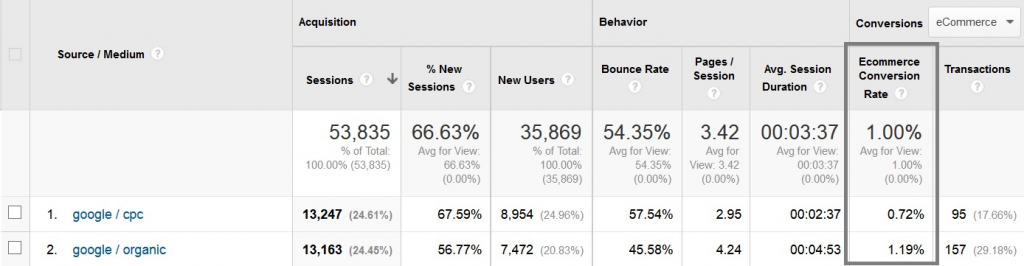
User engagement and user conversion rates are evident. Conversion rate is almost twice of the “Cost per Click” one.
How does paid search effect organic results?
Now, having these facts explained it is safe to say that #1 Google Organic Search Position is likely to generate 5 times as much profit as #1 Paid Search Position. If you are already PPC (CPC) maxed out – your next logical step to growing your business would be looking into your Organic Search Positions standing.
For those of you who wonder how Paid Search effects #1 Organic search position – here are some facts:
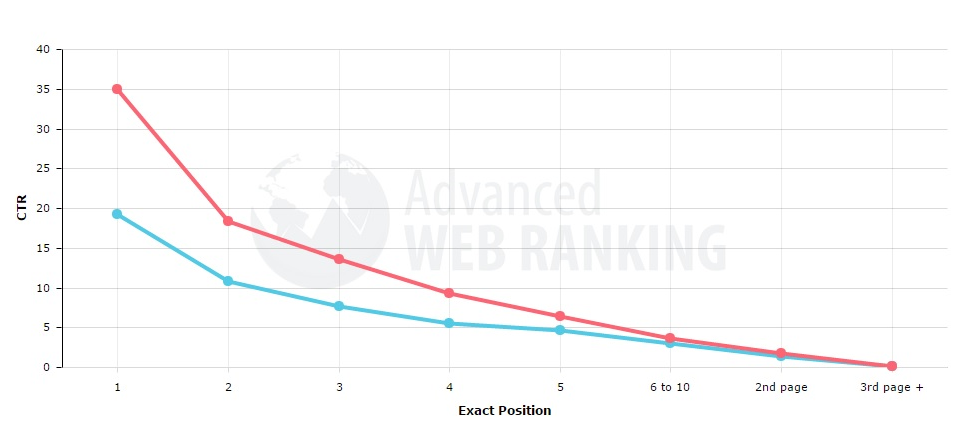
Red graph – paid search is turned off (no AdWords) – #1 organic position gets 35% of all traffic (varies from month to month).
Blue graph – all Adds are turned on all around the organic search results – #1 organic search position now gets around 20% of all traffic (considering you have 9 other organic results as well as up to 10 paid results – that is still very good). Now that we know how extremely valuable organic top search positions are – we can discuss the cost and effort it takes to reach such rankings.
Estimating SEM Cost
If you have been online long enough – you most likely get some “overseas” SEO offers on weekly, if not daily, basis. We get such emails a lot. The basic message across those e-mails fast results for 100 bucks. Quality SEM must be performed by professionals and thus can not be cheap. Cheap SEO – will do nothing for you or will get your website penalized and out of search completely.
Signs of low quality SEO Company:
- Cheap cost regardless of your business niche
- Based “overseas”
- No Google Analytics certification
- No results to show for
- No “Individual” approach
- No SEO strategy presented
- Servicing over 1 client within same competitor niche
- Shady and unclear promotion techniques
Signs of high quality SEM Company:
- US, Canada or UK based;
- Interested in long lasting partnership & results;
- Google Analytics Certified;
- Google AdWords Certified;
- Personal Manager for every project;
- Servicing up to 1 client within same niche;
- Clear representation of SEO strategy;
- Top Search results to show for;
- SEO contract with clear conditions;
- Personal meeting with your SEO manager;
What should effect SEO cost (per website):
- #of products you are promoting
- Websites’ “good standing” (no penalty)
- Websites SEM “readiness” (overall content shape)
- #of competitors within your segment
- Strength of competing websites
- Level of the SEO company you sigh up with
Depending on the factors above a high quality SEO company will decide on how much effort is needed in order to achieve the mutually agreed on results. If you would like to hire a high quality SEM firm full time (40 hours per week) be prepared to lay out $5 000 or more per month. If it is decided that your goal can be achieved at a lower expense the cost could even be reduced to $1 000 / month.
Quality SEO firm will do more!
Search Engine Optimization is a number of critical tasks that include the following sub services:
- Initial WebSite Audit
- KeyWords Research
- Competitor Niche Analysis
- On-Page Website Optimization
- Google Analytics & WebMaster Tools Analysis
- Disavow File Audit
- Off-Page Optimization
- Organic LinkBuilding
- Content Marketing
- Re-Marketing (Facebook, Google)
- Social Media Marketing
- Reputation Marketing
- Personal Project Manager
- Monthly Reports
Our final advice
The following advice is given considering that you really care about your project and you are online to stay for many years to come. If you do not have the budget – try to do your SEO yourself but NEVER hire cheap overseas SEO services. Never settle for an unknown SEM company as they are likely to do more harm than good and move on to another client once you stop paying. Look for honesty, reliability, availability and reputation. Any professional SEO company will tell you that you really have to work hard on your SEO in order to succeed. Feel free to contact us if you would like to know more or if you have any critical thoughts about this article. Thank you.
One last thing
If you want to see an illustration of how SEO (combined with other advertising tools) can be done, read this article about running a campaign for a reputable law firm.
Since 2012 Google started to run an algorithm that penalized websites that manipulate inbound links to increase own search positions. Since 2012, WillBeCoded’s SEO team have successfully restored over 50 websites that were hit by “Penguin” algorithm.
1) Manual sanctions
A moderator from Google’s Spam Team have banned your site and you are being notified about it via Google Webmaster Tools as well as e-mail.
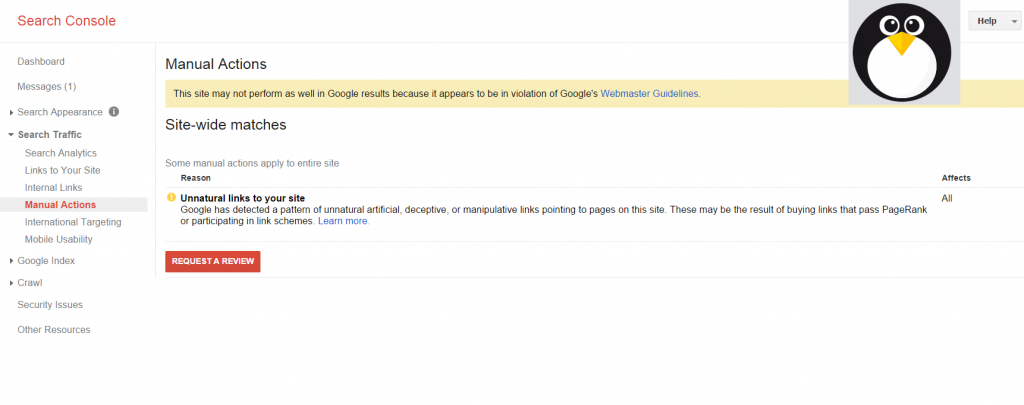
2) Automatic sanctions (aka algorithm penalty)
You are NOT being notified but site significantly loses positions and search traffic. It is worth noting that automatic sanctions could be applied to the whole site, certain page or certain search queries. Example: an online book store could have plenty of traffic on inner category pages, yet its main page – out of top 50 for general search phrases.
4 main indicators that site could get penalized by ‘Penguin’
- 1) Over spammed anchor text (link’s keyword).
- 2) Unnatural concentration of links pointing to the same page.
- 3) Site has an alike inbound link types. Example: footer links only.
- 4) Links form low quality sites. Sites that do not have any traffic from search engines (can be checked with alexa, similarweb etc…). Example – site is out of Alexa top 2 million.
How to Take Sanctions for Unnatural Links Off in Google
There are a few steps to be taken to remove website’s penalties:
1) With the help of services like majesticseo, ahrefs and Google Websmater Tools – collect all links pointing to your site (or at least linking domains if links exceed a few reasonable thousands) and make an excel spreadsheet out of them. Add columns with the deletion status (for those you will remove manually), spam and not spam columns. In some cases it is mandatory to collect both incoming links to your site with “www” and without “www” – sort them out and delete duplicates (in some cases you could find up to 10% of additional linking domains to your site).
2) Every inbound link/domain must be manually checked for spamminess. Example: if site is indexed; if page is indexed; if content is indexed; # of links from that page/domain; is that link of an organic nature; is that site ranked well in google; is that site selling links; domain age, last updates on that site (is it dead or not), trust flow to that site, is it indexed by domain key words in top 10; etc… Depending on # of domains that are linked to you – you can automatically sort out weak domains by trust flow as an example to save time.
3) Spammy links must be combined into a separate table for manual removal. You have to e-mail those spammy webmasters and do your best to have those links removed. In some cases webmasters will ask for compensation to have links removed ($5 is an average cost per such removal but it can vary – try not to pay over $10 per such “favor”). If you are unable to reach that webmaster or remove the link on your own – try looking into “who is” data and retrieve contact e-mail or admin’s phone number – call, negotiate and have that link removed. You must document this process in order to show it to Google later on for them to know that you have spent the time to actually clean the site up.
4) Next step is to create a disavow file in a certain format and submit it. Format can be a simple .txt file with domains or links listed from new lines:
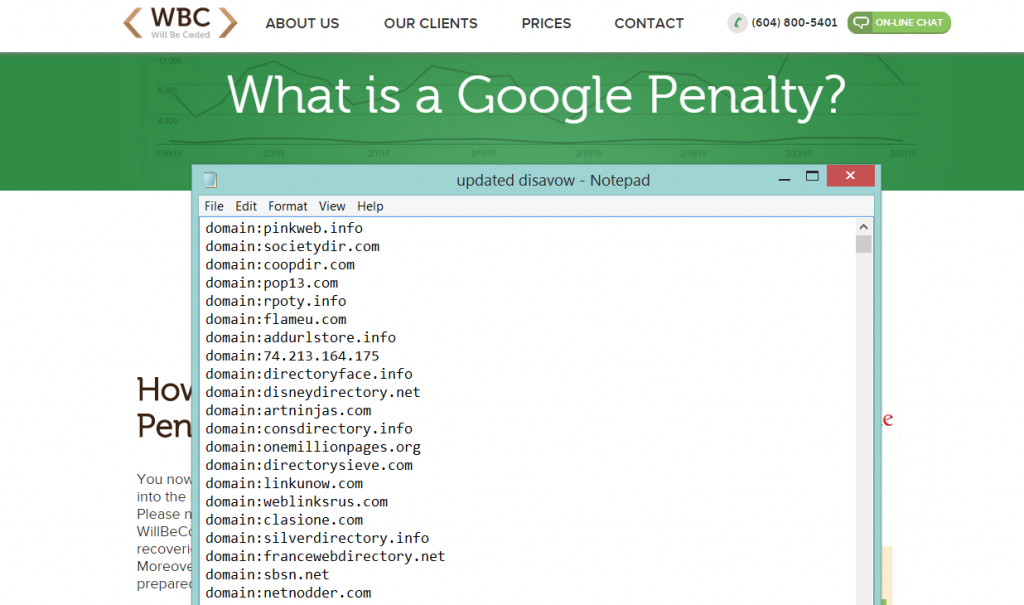
After you are done with the disavow file that contains all the bad domains that link to you – you are ready to upload it into a Disavow Tool – https://www.google.com/webmasters/tools/disavow-links-main
Select the domain, select the file and submit it:
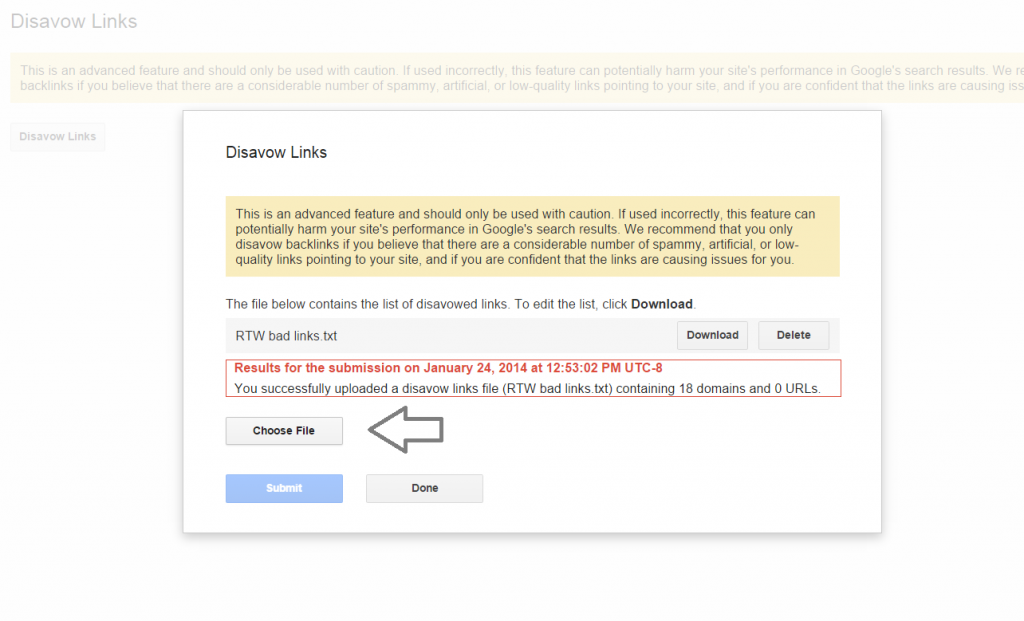
If your sanctions are manual – you will have to upload the disavow file and manually delete approximately 50% of those bad links and your reconsideration request will be approved, although it may take you a few attempts. Yet, not always a successful reconsideration request will lead to an instant Search Positions Recovery as deleted links will no longer be juicing your website. In addition, very often, your site will not only have manual sanctions that we already have taken care of – but an algorithm penalty as well. In such case, when reconsideration was granted and you feel that you still have stronger backlinks profile than your competition, yet search rankings are still low – carry on with manual bad links removal process. You will have to manually remove (they also expire over time) enough bad links in order for and algorithm penalty to let you go (bad news is that they do not run it very often).
If your site has algorithm penalty only – every 20% of bad links removed will positively effect your search positions. Make sure to have a well prepared disavow file uploaded. After roughly 80% of such bad links are removed – your site will regain its full strength based on your legit linking profile. In most cases it would take up up to 2 months of work to have manual penalties reconsidered.
Conclusion: if you really care about your site – trust your SEO to professionals or make sure you do a high quality job with that regard!
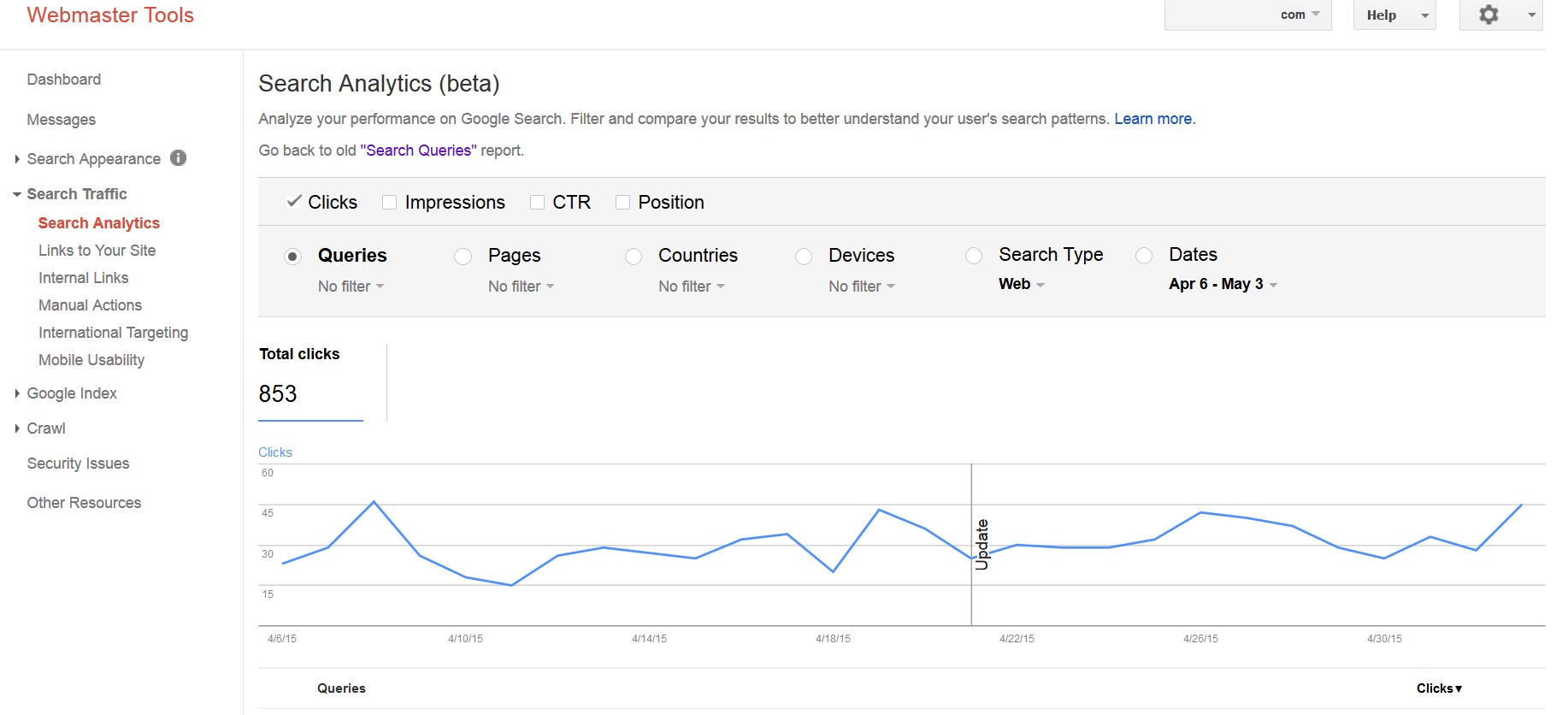
Google Webmaster Tools is in the middle of a big update that will help Webmasters get a higher quality insights on how their content is being searched.
We have been waiting for a long time now such an improvement. WillBeCoded strongly believes that Google Webmaster Tools (GWT) is all that a Webmaster should need and that GWT must take the best from MajesticSEO, Ahrefs etc…
Google Calls it: “Search Analytics (beta)”, “Analyze your performance on Google Search. Filter and compare your results to better understand your user’s search patterns”, feel free to find out more here!
Webdesign is considered one of the most important stages in website development.
Here is a small glimpse of how we design our websites. All our latest designs are responsive.
WillBeCoded approaches responsive design “from big to small”: from PC version down to Tablet and finally cell phone friendly site appearance. The reason we go “from big to small” is because for most of our customers PC website version is naturally the most important. Such importance is being defined by 2 major factors: over 80% e-commerce visitors search from PC and land on PC website; such visitors have around 4 times as greater conversion rate as mobile site users (accurate for 2015).
Considering all the factors mentioned above – we have to devote an extra attention to the PC version of webdesign. Below is a case study of web design evolution (from draft to final version) of one of our 2015 projects.
Version 1 (concept)

Version 1.1 (concept)
Changes: logo, “our clients”
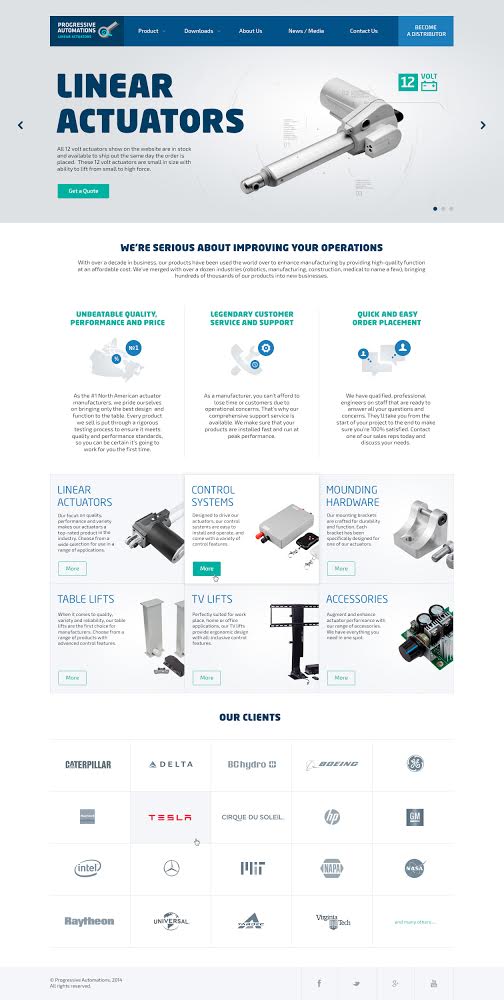
Version 2 (concept)
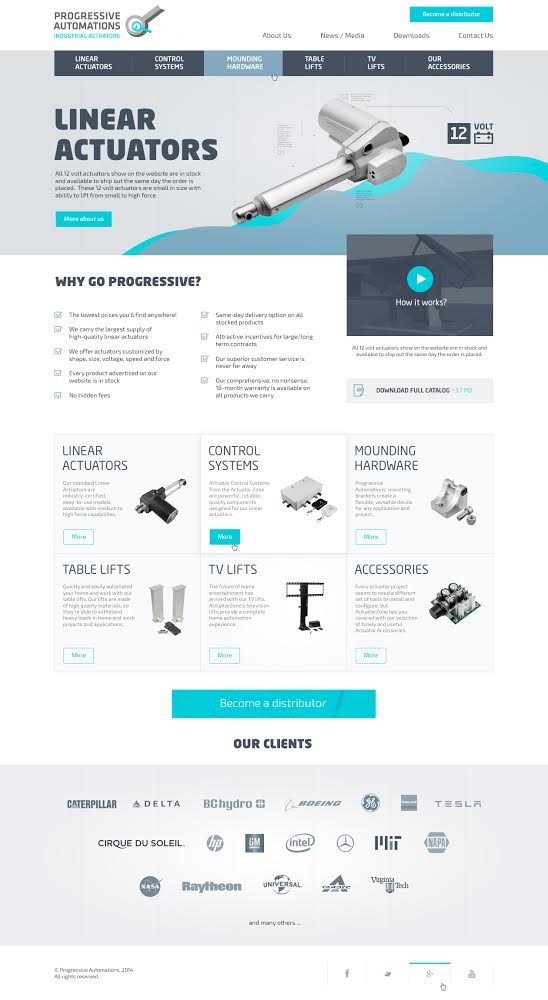
Version 3 (concept)

Version 4 (concept): Approved
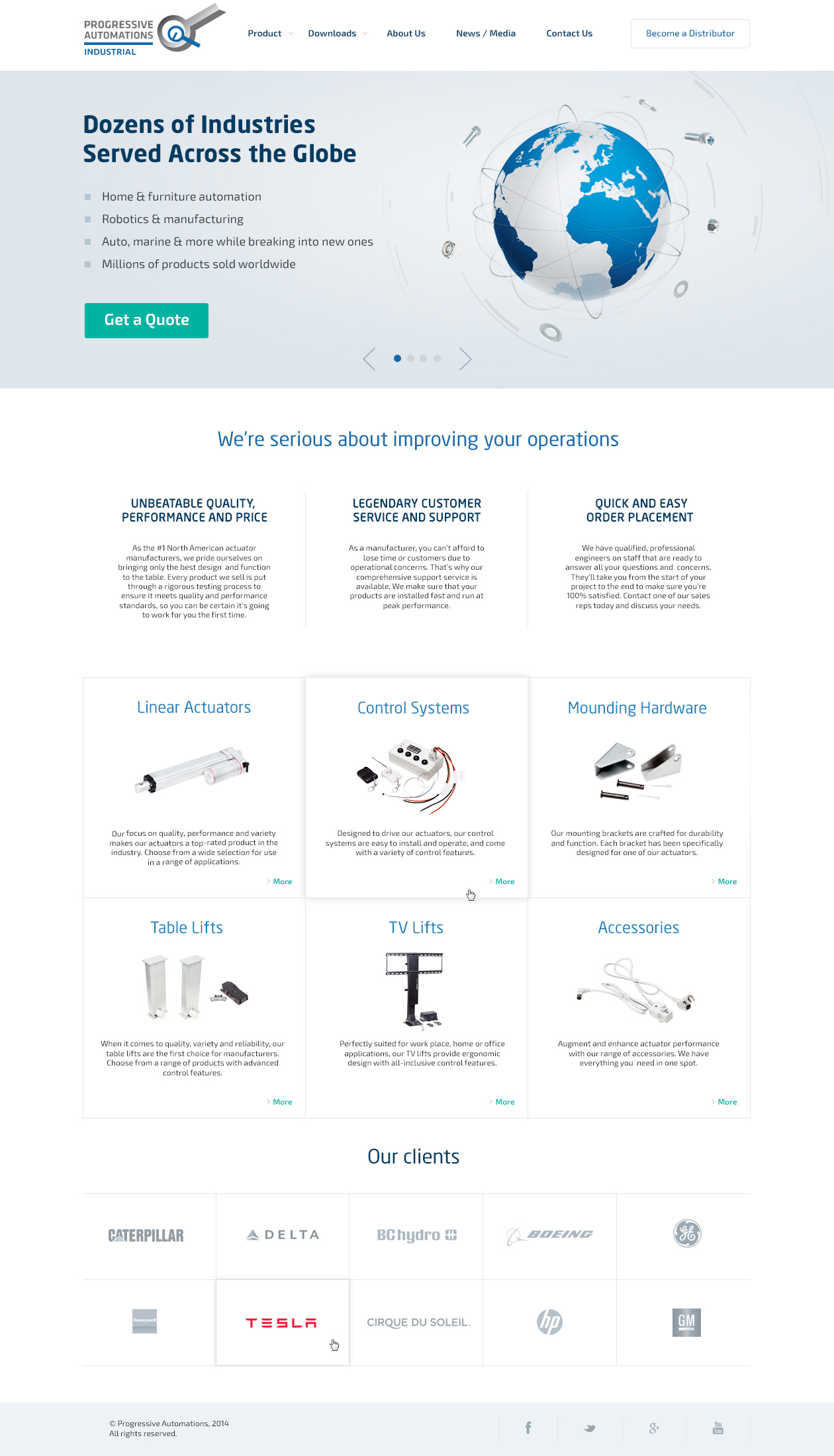
Of course, there have been many more variations of the “Approved Concept” Version with minor changes – that has resulted in a wonderful “business to business”, responsive website – LinearActuator.org
Another sample of creative web design for International Academic Students – https://pandascholar.com/
Thank you for reading!
Online service or product ordering process at times can be multi-stages and not all too transparent. Below are 5 most common e-commerce order process mistakes.

1. Obligatory Online Registration
Many of us would say that mandatory registration is very useful because you can get the customers` contacts for your future email advertising campaigns. Yet, in many cases – number of lost orders could be much higher than the number of successful once that you could get by using those contacts in your email marketing campaigns.
In addition, if needed, you could always win users’ contacts on voluntarily basis through discounts, contests, bonuses etc.
2. A long ordering process (multi-stage order forms)
There are sites that require 3-4 order steps from you, including your passport detail, to get an order placed. Although, in most cases – if your product / offer is not unique, most customers will leave the shopping cart empty and go to a more adequate competitor who appreciates the time of its customers.
3. Too much information required
For example, you may not have to register on the website and ordering process consists of only one step, but you want the users to specify a full address along with the zip code, which often buyers cannot remember, yet without which – clients are not allow to finalize the purchase.
Ask only crucial info to have the order started / done and to correctly address the product delivery.
4. Transparent information about shipping and payment
Try not to narrow the payment methods or shipping options down – offer maximum transparency and flexibility.
5. Speed of your Website
Your site must work really fast! Customers do not like waiting for pages to load, for shopping carts to update. Try to have your site load and operate – instantaneously.
Check Google site speed tool here – https://developers.google.com/speed/pagespeed/insights/. Preferably, be hosted on SSD type hosting within the country that most of your customers come from – this will significantly affect your site’s user experience.